
Fluxisp Static and Residential Proxies Guide and Use Cases
 Lucas
Lucas
 2026-04-27 16:00
If you are looking for a stable, clean, and developer-friendly IP service, you may have already heard of Fluxisp.
However, for first-time users, simply reading the descriptions on the official website might not be enough. What exactly is Fluxisp? What products does it offer? What are its ideal use cases? And how do you register, integrate, and get started?
This article will address these questions one by one. Whether you are a software developer, a cross-border e-commerce seller, or a data collection engineer, by the time you finish reading, you should have a comprehensive understanding of Fluxisp and know exactly how to get started.
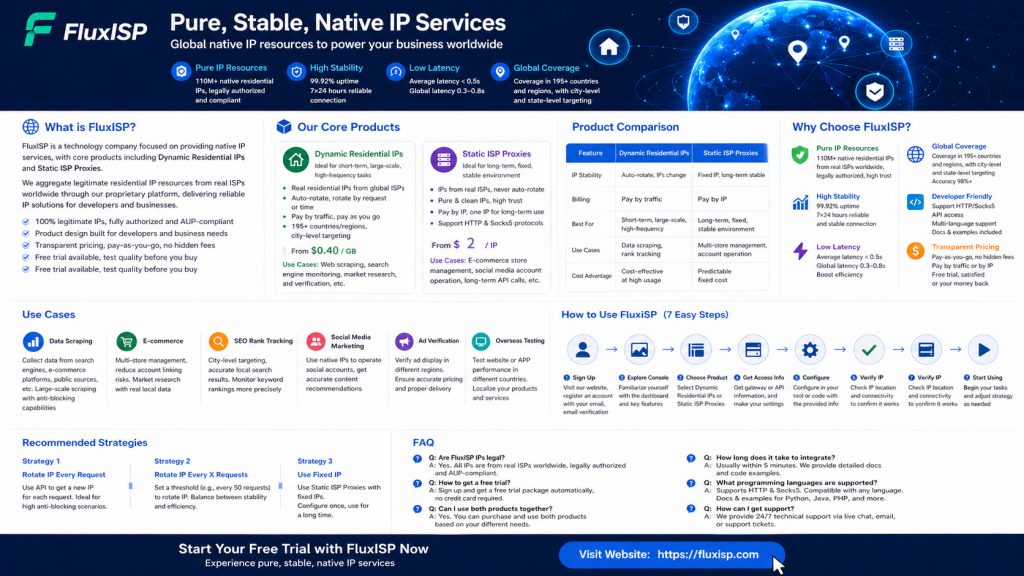
Fluxisp is a technology company specializing in native IP services, with a core product portfolio that includes dynamic residential IPs and static ISP proxies.
Simply put, Fluxisp’s mission is to acquire legitimate residential IP resources from Internet Service Providers (ISPs) across the globe, integrate them via a technical platform, and make them available to developers and enterprise users in need.
Unlike many other IP service providers on the market, Fluxisp adheres to several key principles:
To date, Fluxisp has served a diverse range of users from around the globe—including developers, cross-border e-commerce teams, data collection companies, SEO service providers, and more.
Fluxisp offers two core products, each designed to meet the needs of different scenarios.
Product Positioning: Suitable for short-term, large-scale, and high-frequency data collection tasks.
Core Features:
Billing Method:As low as $0.40/GB
Applicable Scenarios: Search engine ranking monitoring, e-commerce data collection, market research, ad verification, etc.
Product Positioning: Suitable for long-term, fixed operations requiring a stable environment.
Core Features:
Billing Method:As low as $2 each
Applicable Scenarios:Cross-border e-commerce multi-store management, social media account operations, long-term API access, business systems requiring static IPs, etc.
Product Positioning: Suitable for continuous tasks with high traffic consumption and predictable costs.
Core Features:
Billing Method: $0.38 per port per day, billed weekly or monthly
Use Cases: Large-scale long-term data scraping, continuous SEO rank monitoring, round-the-clock cross-border e-commerce operations, enterprise-level proxy pool setup.、全天候跨境电商运营、企业级代理池搭建。
| Comparison Dimension | Dynamic Residential IP | Static ISP Proxy | Unlimited Traffic Plan |
|---|---|---|---|
| IP Stability | Auto-rotating, IP changes | Fixed IP, long-term stable | Depends on selected mode |
| Billing Method | Pay per traffic | Pay per IP | $0.38 per port per day |
| Traffic Limit | Pay-as-you-go | No traffic limit | Unlimited traffic |
| Number of IPs | Single IP at a time | Single IP | No limit on IPs |
| Suitable Tasks | Short-term, large-scale, high-frequency | Long-term, fixed, needs stable environment | Continuous, high traffic, cost-sensitive |
| Representative Scenarios | Data scraping, rank monitoring | Multi-store management, account operations | Enterprise-level long-term scraping |
| Cost Characteristics | Cost-effective for small usage | Fixed and predictable | More cost-effective for high traffic |
The three products can be flexibly selected or mixed according to specific tasks.
Fluxisp has several notable features in its product design.
Fluxisp provides over 110 million native residential IPs, all legally authorized. This means these IPs come from stable network environments rather than data center server farms.
Using clean IPs to request sensitive websites results in a much lower probability of triggering CAPTCHAs or being blocked compared to regular data center IPs. This is a core advantage that sets Fluxisp apart from many IP service providers.
Network stability directly impacts business continuity. Fluxisp has achieved a measured network stability rate of 99.92%, supporting 7×24 hour long-term tasks.
Whether running a week-long large-scale scraping operation or managing long-term cross-border e-commerce storefronts, you won’t need to worry about frequent disconnections.
Response speed determines task efficiency. Fluxisp’s average response time is less than 0.5 seconds, with cross-border latency between 0.3 and 0.8 seconds.
This speed is sufficient for most business scenarios. Loading overseas websites, calling API interfaces, and sending scraping requests all feel smooth without noticeable lag.
Fluxisp covers more than 195 countries and regions, supporting city-level and state-level precise targeting.
Need data from New York? You can get a New York IP. Need data from Tokyo? You can get a Tokyo IP. Need data from London? You can get a London IP. The measured targeting accuracy is above 98%.
Fluxisp provides complete integration support for developers:
New users can complete integration within 5 minutes, while experienced developers can achieve more flexible integration via the API.
Fluxisp adheres to pay-as-you-go pricing with no hidden fees.
New users can also try the free trial to test IP quality and stability before deciding whether to pay.
Fluxisp’s products cover multiple business scenarios.
Whether it’s search engine result scraping, e-commerce platform data extraction, or public information collection, Fluxisp provides clean IP support. Dynamic residential IPs are suitable for high-frequency, large-scale scraping, while static ISP proxies are suitable for long-term scraping tasks requiring fixed IPs.
Multi-store management on platforms like Amazon, Shopee, and eBay faces high risks of account association. Fluxisp’s static ISP proxies can bind an independent IP to each store, reducing association risks. Additionally, using native IPs of target countries for market research allows you to obtain local product information.
Keyword rank monitoring requires simulating user search behavior from different regions. Fluxisp supports city-level targeting, allowing you to obtain localized search results for cities like New York, Los Angeles, and London. The rotation mechanism of dynamic residential IPs also effectively reduces the chance of triggering CAPTCHAs.
Managing accounts on platforms like TikTok, Instagram, and Facebook has certain requirements for the IP environment. Using native IPs from your target market to log in and operate helps ensure accounts receive correct traffic recommendations. Static ISP proxies are suitable for social media accounts requiring long-term stable operation.
Ad delivery requires verifying how ads appear in different regions. Fluxisp’s city-level targeting precisely matches target markets, helping advertisers confirm whether ads are displayed correctly and prices are accurate.
When your product needs to serve overseas users, testing localization features is important. Using Fluxisp to switch between different countries’ IPs allows you to quickly verify how your website or app appears in different regions.
The following is a practical step-by-step guide from registration to integration.
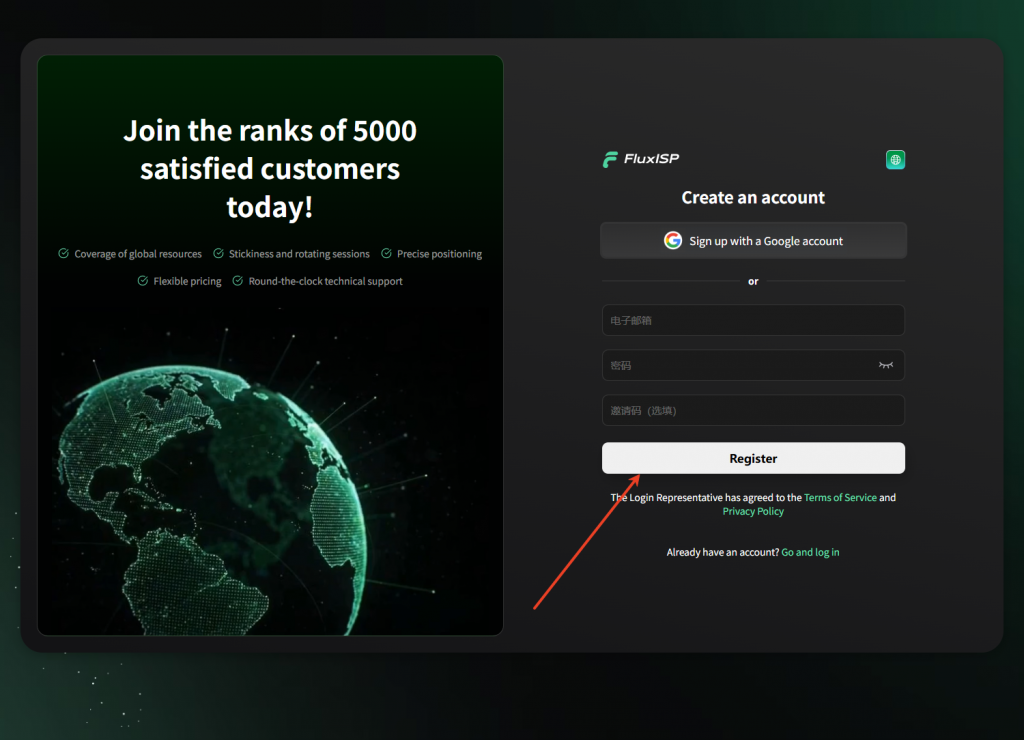
Visit the Fluxisp official website and click the Register button on the homepage.
Fill in your email address and password to complete registration. After successful registration, the system will automatically activate a trial package for you – no credit card required.
After logging in, you will see several main sections in the console:
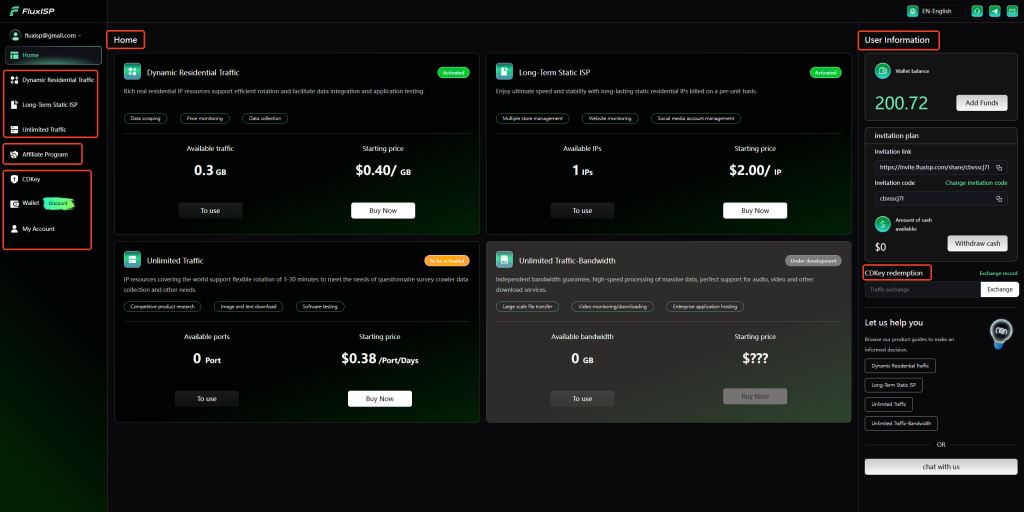
Select either Dynamic Residential IP or Static ISP Proxy based on your business needs.
Selecting Dynamic Residential IP:
On the proxy management page, choose the “Dynamic Residential IP” product. The system will generate a proxy gateway address and port. You can also select a desired country or city node – for example, selecting the New York node will allocate a New York IP.
Selecting Static ISP Proxy:
On the proxy management page, choose the “Static ISP Proxy” product. Select the desired country and region, and the system will allocate one or more fixed IPs to you. Each IP has its own gateway information.
Selecting the Unlimited Traffic Plan:
On the plan management page, choose the “Unlimited Traffic Plan”. Subscribe at a rate of $0.38 per port per day, billed weekly/monthly. Once subscribed, you can use Fluxisp’s proxy service without traffic limits during the plan’s validity period, and one port can bind multiple IPs.
For both dynamic and static products, Fluxisp provides two access methods.
Method 1: Using a Gateway
The gateway address is unified, and the system automatically allocates IPs. Suitable for most scenarios with simple configuration. You will receive the following information:
Method 2: Using the API to Obtain IPs
If you need to obtain IPs dynamically within your code, you can call Fluxisp’s API interface. The API will return an available IP address and port for immediate use.
In the tool or script where you want to use the proxy, enter the gateway information or IP information obtained in Step 4.
Commonly supported tools include:
Configuration is typically done in the tool’s settings or proxy options by entering the host address, port, username, and password.
After configuration, visit an IP lookup website to check whether the displayed IP address matches your expected region.
For dynamic residential IPs, refresh the page multiple times to observe whether the IP rotates as expected.
Once configuration is verified, you can start using it normally. Adjust parameters such as request frequency and rotation strategy based on your business needs.
If you encounter issues, refer to the official documentation or contact technical support.
Some scraping tasks require using a different IP for each request. You can call Fluxisp’s API to obtain a new IP address before each request.
If you don’t need to switch IP for every request, set a threshold – for example, switch IP every 50 requests. This reduces the risk of IP blocks without impacting efficiency through overly frequent switching.
When using a static ISP proxy, the IP is fixed and doesn’t require frequent switching. Simply configure the fixed gateway information in your tool once for long-term use.
Q: Are Fluxisp’s IPs legal?
A: Yes. All of Fluxisp’s IP resources come from stable global network environments and are legally authorized, complying with AUP policies.
Q: How do I get the free trial?
A: The trial package is automatically granted upon account registration – no credit card required.
Q: Can I mix Dynamic Residential IP and Static ISP Proxy?
A: Yes. You can purchase both products simultaneously and flexibly choose them based on different tasks.
Q: How long does it take to integrate Fluxisp?
A: From registration to completing your first request, it takes about 5 minutes with some familiarity. Documentation and examples are provided, making the integration barrier relatively low.
Q: Which programming languages are supported?
A: Fluxisp supports standard HTTP and Socks5 protocols, so any programming language with proxy configuration support can use it. Official documentation and examples are available for Python, Java, and PHP.
Q: How do I get support if I encounter issues?
A: Fluxisp provides 7×24 hour technical support. You can contact customer service via the official website or submit a ticket.
Fluxisp is a product focused on native IP services, providing clean, stable, and developer-friendly IP resources.
Whether you need dynamic residential IPs for short-term large-scale scraping or static ISP proxies for long-term stable operations, Fluxisp has you covered. Combined with a free trial, transparent pricing, and comprehensive technical support, it is quite friendly to both new users and experienced developers.
If you’re looking for a reliable IP service, give Fluxisp a try. Sign up for the trial first, test the IP quality, and decide when you’re satisfied.
Visit https://fluxisp.com to start your free trial now.
